Guides

Reverse Email Lookup: 10 Free Tools to Find Who's Behind Any Email

By Dean Fiacco

· Published April 8, 2026

Reverse Email Lookup: 10 Free Tools to Find Who's Behind Any Email

Quick answer: A reverse email lookup is the process of taking an email address and finding the person or organization behind it, including their name, job title, company, and social profiles. The best free tools are Google Search (in quotes), LinkedIn search, Hunter.io (25 free lookups/month), Epieos (OSINT), and Mailmeteor (no signup). For bulk B2B enrichment, combine two or three tools for the best results.

You got an email from someone you don't recognize. Maybe it's a potential lead, maybe it's spam, maybe it's someone who ghosted you three months ago using a different address. You need to figure out who this person actually is.

That's where a reverse email lookup comes in. And the good news: you don't need to pay for it.

I've tested dozens of these tools across thousands of prospect research sessions. Some are genuinely useful. Most are garbage wrapped in a clean UI. Here are the 10 that actually return real data, what they're good at, and where they fall short.

What Is a Reverse Email Lookup?

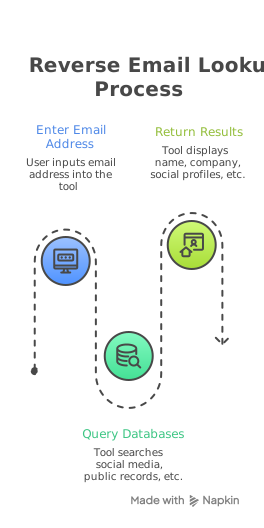
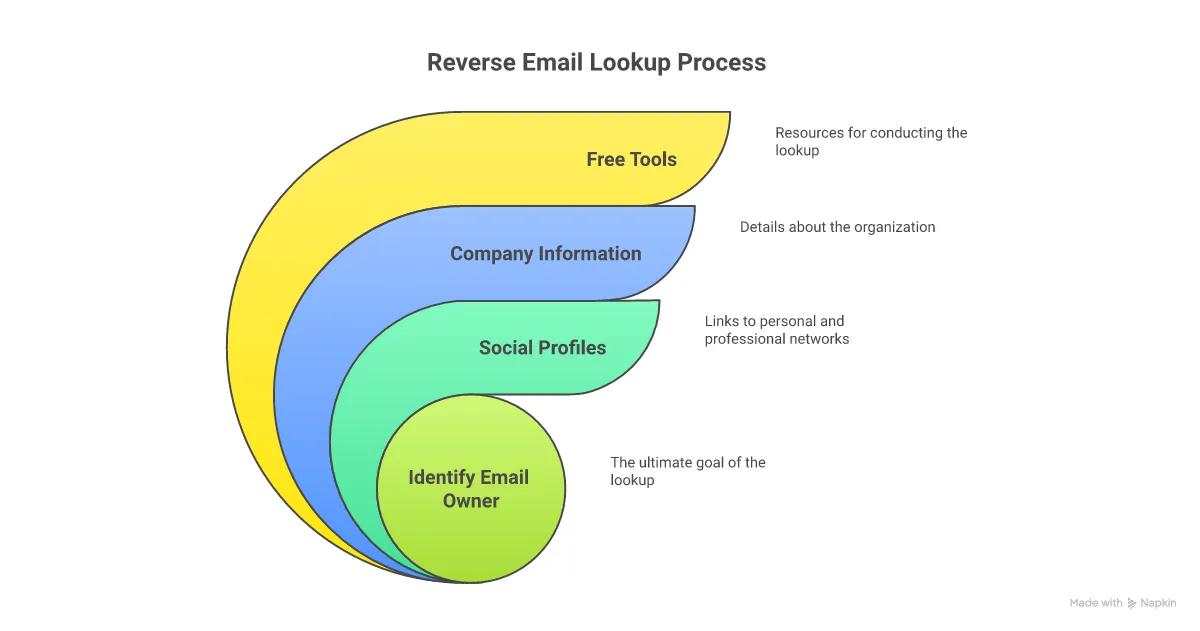
A reverse email lookup is the process of taking an email address and finding information about the person or organization behind it. Instead of searching by name to find someone's email, you work backward, using the email address to uncover details like the owner's full name, job title, company, social media profiles, phone number, and location.

Think of it like caller ID for your inbox. Someone emails you, and instead of guessing who they are based on a vague signature line, you plug their address into a tool and get the full picture.

The data comes from publicly available sources: social media profiles, company websites, business directories, domain registrations, and professional databases. No one's hacking anything. These tools aggregate what's already out there and connect it to an email address.

Two things to know upfront:

  • Business email addresses (john@company.com) return significantly better results than personal addresses (randomguy42@gmail.com). The more unique the domain, the more data you'll get back.
  • No single tool gives you everything. The best approach is stacking two or three tools together to build a complete profile.

10 Best Free Reverse Email Lookup Tools in 2026

Here's what actually works. I've organized these from simplest (zero setup) to most advanced (OSINT-level research).

1. Google Search

Cost: Free. Always.

Before you touch any tool, just Google the email address. Put it in quotes: "john.smith@company.com".

You'd be surprised how often this returns exactly what you need. Forum posts, conference speaker bios, GitHub profiles, old press releases, cached LinkedIn pages. If someone has used that email address publicly even once, Google probably indexed it.

What it does well:

  • Finds public mentions across the entire web
  • Surfaces forum posts, directories, and profiles other tools miss
  • Zero signup, zero rate limits

Where it falls short:

  • No structured data. You get raw search results and have to piece things together yourself.
  • Personal Gmail addresses rarely surface useful results.

Verdict: Always start here. It costs nothing and takes 10 seconds.

2. Social Media Search (LinkedIn, Facebook, X)

Cost: Free (with accounts)

Each major platform has its own email-based search. LinkedIn is the most useful for B2B. Go to the search bar, paste the email address, and see if a profile comes up. Facebook and X work similarly through their "find friends" or contact import features.

LinkedIn is the gold mine here. If someone uses their work email on LinkedIn (most professionals do), you'll get their full name, current role, company, location, and career history. That's more context than most paid tools provide.

What it does well:

  • LinkedIn returns rich professional data for free
  • Facebook surfaces personal connections and location
  • X reveals public personas and interests

Where it falls short:

  • Only works if the person registered with that specific email
  • LinkedIn limits searches without a premium account
  • Privacy settings can block results entirely

Verdict: LinkedIn search alone is worth more than half the paid tools on this list.

3. Hunter.io

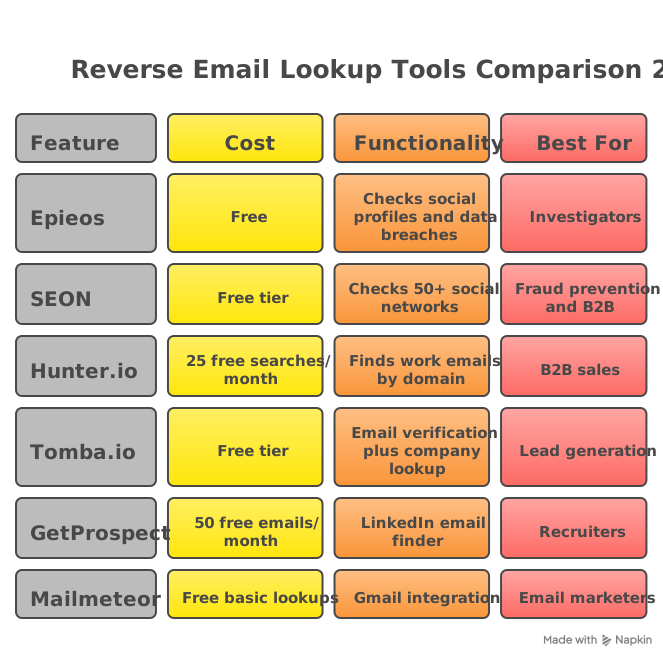
Cost: Free tier (25 searches/month) | Paid plans from $49/month

Hunter is built for B2B. Paste in a business email and it returns the person's name, job title, company, and other email addresses associated with that domain. It also gives you a confidence score so you know how reliable the data is.

The reverse lookup is part of their broader email finding platform. If you're doing outbound prospecting, you've probably already seen Hunter. The free tier is generous enough for casual use. If you're doing more than 25 lookups a month, you'll need to pay.

What it does well:

  • Clean, structured data for business emails
  • Confidence scoring on results
  • API access for automation
  • Also shows other contacts at the same company

Where it falls short:

  • 25 free lookups per month is tight for heavy users
  • Weak on personal email addresses
  • Primarily focused on professional/work emails

Verdict: Best free option for B2B email enrichment if you're under 25 lookups a month.

4. ContactOut

Cost: Free tier (4 credits/day) | Paid plans from $79/month

ContactOut started as a LinkedIn email finder, but their reverse lookup works well too. Feed it an email address and it pulls back the associated LinkedIn profile, phone numbers, and other contact details.

The Chrome extension is where ContactOut shines. When you're browsing LinkedIn and want to cross-reference emails, it overlays the data right on the profile. For reverse lookups specifically, the free tier gives you 4 credits per day, which is enough for spot-checking but not for bulk work.

What it does well:

  • Strong LinkedIn integration
  • Returns phone numbers alongside email data
  • Chrome extension is convenient for daily prospecting

Where it falls short:

  • 4 daily credits disappear fast
  • Paid plans are expensive relative to competitors
  • Data accuracy varies for non-LinkedIn-connected emails

Verdict: Great if you live in LinkedIn and need to cross-reference email addresses with profiles.

5. Swordfish AI

Cost: Free tier (limited) | Paid from $99/month

Swordfish aggregates data from multiple identity verification sources to return phone numbers, social profiles, and personal details tied to an email address. Their real strength is phone number accuracy, which makes them a favorite with sales teams that combine email outreach with cold calling.

The free tier is limited, but it gives you enough to evaluate whether the data quality justifies the price. For sales teams running multi-channel plays (email plus phone), Swordfish fills a gap that most email-only tools miss.

What it does well:

  • Best-in-class phone number accuracy
  • Pulls from identity verification databases others don't access
  • Chrome extension works across LinkedIn, Twitter, and Facebook

Where it falls short:

  • Free tier is restrictive
  • Expensive compared to email-only tools
  • Overkill if you only need basic email-to-name lookups

Verdict: Worth it if you need phone numbers alongside email enrichment. Overkill for simple reverse lookups.

6. BeenVerified

Cost: Free basic search | Full reports require subscription ($26.89/month)

BeenVerified is a people search engine, not specifically an email tool. But their reverse email lookup pulls from public records, social media, and proprietary databases to build surprisingly detailed profiles. Names, addresses, phone numbers, social accounts, and sometimes even criminal records.

The thing is, the free version gives you a teaser. You'll see that results exist, but the full report is behind the paywall. For personal email addresses (Gmail, Yahoo, Outlook), BeenVerified actually outperforms most B2B-focused tools because it pulls from consumer databases that business tools don't touch.

What it does well:

  • Deep results for personal email addresses
  • Pulls from public records databases
  • Includes address history and phone numbers
  • Good for fraud detection and background checks

Where it falls short:

  • Full reports require a subscription
  • The "free search" is really a preview
  • Less useful for B2B prospecting than business-focused tools

Verdict: Best option when you need to identify someone behind a personal Gmail or Yahoo address.

7. Spokeo

Cost: Free preview search | Full reports from $19.95/month

Spokeo works similarly to BeenVerified. It aggregates public records, social media profiles, and online data to build people profiles from an email address. The interface is cleaner and the results tend to surface social media connections more prominently.

Where Spokeo stands out is social media profile matching. It does a good job connecting an email address to Instagram, Pinterest, Snapchat, and other platforms that most B2B tools ignore completely. If you're trying to understand someone's full digital footprint beyond LinkedIn, Spokeo covers more ground.

What it does well:

  • Broad social media profile matching
  • Clean, easy-to-read reports
  • Good coverage of lesser-known social platforms
  • Useful for personal investigation and verification

Where it falls short:

  • Real value is behind the paywall
  • Data can be outdated (public records lag)
  • Not designed for B2B sales use cases

Verdict: Strong for personal investigations and social media footprint mapping. The free preview shows you enough to decide if the full report is worth paying for.

8. Mailmeteor

Cost: Free (no signup required)

Mailmeteor built a dedicated reverse email lookup tool as part of their email toolkit. It's OSINT-powered, meaning it scans publicly available data across the web and returns the owner's name, job title, company, and social profiles.

The appeal is zero friction. No account needed, no credit card, no daily limits that matter for casual use. You paste in an email, hit search, and get results. For a quick lookup where you need a name and company fast, it's hard to beat the simplicity.

What it does well:

  • No signup required at all
  • Returns structured professional data
  • OSINT-based approach covers broad sources
  • Part of a larger email toolkit (email finder, email checker, etc.)

Where it falls short:

  • Limited depth compared to paid enrichment tools
  • Works best with professional emails, limited results for personal addresses
  • No API for automation or bulk lookups

Verdict: The fastest path from "I have an email address" to "I know who this person is." Best for one-off lookups where speed matters more than depth.

9. Pipl

Cost: Enterprise only (no public free tier)

Pipl is an identity resolution platform used by fraud teams, compliance departments, and enterprise sales organizations. Their database connects email addresses to phone numbers, social profiles, addresses, and cross-referenced identity data across billions of records.

The catch: Pipl doesn't offer a consumer-facing free tool anymore. They've gone fully enterprise. But they're worth mentioning because if you're at a company with a Pipl license, it's the most comprehensive reverse email lookup available. The data depth is in a different league.

What it does well:

  • Deepest identity database available
  • Cross-references data across billions of records
  • Used by fraud prevention and compliance teams worldwide
  • Handles personal email addresses better than any B2B tool

Where it falls short:

  • No free tier or consumer access
  • Enterprise pricing (typically $10K+/year)
  • Requires a sales conversation to get started

Verdict: If your company already has Pipl access, use it first. If not, it's not accessible for individual users.

10. OSINT Tools (Epieos, That'sThem, and More)

Cost: Free

For the technically inclined, OSINT (Open Source Intelligence) tools are the Swiss Army knife of reverse email lookups. Epieos is the standout here. Paste in an email address and it tells you which platforms that email is registered on, associated Google account details (like Google Reviews and Google Maps contributions), and sometimes even connected calendar information.

Epieos specifically checks registration status across dozens of platforms: Spotify, Adobe, Twitter, LinkedIn, Instagram, and more. It tells you "this email is registered on these services" without accessing those accounts. That information alone can tell you a lot about someone.

That'sThem takes a different approach, pulling from consumer databases to return names, addresses, and phone numbers tied to an email. It's fully free and doesn't require an account.

What OSINT tools do well:

  • Reveal which services and platforms an email is registered on
  • Epieos uncovers Google account metadata most tools miss entirely
  • That'sThem provides free consumer-level data with no signup
  • Powerful when combined with other tools on this list

Where they fall short:

  • Raw data requires manual interpretation
  • Interface can feel technical and intimidating
  • Results vary wildly based on the email address
  • No CRM integrations or workflow automation

Verdict: Epieos is the most underrated tool on this list. Combine it with Google Search and LinkedIn, and you have a free reverse lookup stack that rivals most paid solutions.

How to Do a Reverse Email Lookup Step by Step

Here's the actual workflow I'd use if someone handed me an email address and said "find out who this is."

Step 1: Google it. Put the email in quotes and search. Scan the first two pages of results. You'll often find the answer right there.

Step 2: Check LinkedIn. Paste the email into LinkedIn's search bar. If the person used that address to register, you'll get their full professional profile.

Step 3: Run it through Epieos. This tells you which platforms the email is registered on. If it shows a Twitter account, go look at their Twitter. If it shows Google account data, you might get a name and profile photo.

Step 4: Use a B2B tool. If it's a business email, run it through Hunter.io or ContactOut. These return structured data like job title, company, and phone number.

Step 5: Check a people search engine. For personal email addresses, try BeenVerified or Spokeo. Their consumer databases fill gaps that B2B tools can't.

Step 6: Cross-reference everything. Take the name you found in Step 1-5 and verify it across multiple sources. A name from Hunter.io that matches a LinkedIn profile that matches a Google search result is a confirmed identity.

The whole process takes 5-10 minutes. For a one-off lookup, that's all you need. For finding email addresses at scale, you'll want tools with API access and automation.

Using Reverse Email Lookup for Sales Prospecting

If you're in sales or marketing, reverse email lookup is a core part of lead enrichment.

Here's how teams actually use it:

Enriching inbound leads. Someone fills out a form with their email address and nothing else. A reverse lookup instantly fills in their name, company, title, and social profiles. Your sales rep walks into the call with context instead of a blank screen.

Validating prospect data. You pulled a list of 500 leads from a data provider. Before you send a single email, run those addresses through a reverse lookup to verify the contacts are real people at real companies. Bad data burns domains and wastes campaigns.

Building contact profiles. You found an email address through a social media search or phone number lookup. A reverse email lookup fills in the rest of the profile so you can personalize your outreach.

Qualifying leads faster. Instead of spending 15 minutes researching each prospect manually, a reverse lookup gives you enough context in seconds to decide whether someone is worth reaching out to.

The reverse lookup is one piece of the prospecting puzzle. You still need to find the right social media accounts to understand what your prospects care about, build a message that resonates, and make sure your emails actually hit the inbox.

That last part is the one most people underestimate. You can have perfect prospect data and a strong message. But if your emails land in spam because your sending infrastructure isn't set up right, none of it matters. That's what ScaledMail handles. We take care of the domains, DNS, warmup, and deliverability monitoring so your team can focus on the outreach itself.

Frequently Asked Questions

Is reverse email lookup legal?

Yes. Reverse email lookup tools access publicly available information, things like social media profiles, business directories, domain registrations, and public records. No private data is being accessed or hacked. In the US, aggregating public data is legal. Tools that operate in the EU also comply with GDPR by only returning data that's already publicly accessible. That said, how you use the information matters. Using it for legitimate purposes like business outreach, fraud prevention, or identity verification is fine. Using it for harassment or stalking is not.

Are free reverse email lookup tools accurate?

They're accurate enough for most use cases, but no single tool is 100% reliable. Free tools pull from public databases that may be outdated or incomplete. Business email addresses consistently return better results than personal addresses because there's more public data tied to professional identities. For the most accurate results, cross-reference data from two or three tools rather than relying on one.

Can I do a reverse email lookup on a Gmail address?

You can, but the results will be limited compared to a business email address. Gmail addresses don't have the domain-level data that makes business emails easy to trace. Your best bet for personal addresses is a combination of Epieos (to find linked accounts), Google Search (to find public mentions), and a people search engine like BeenVerified or Spokeo (to access consumer databases). You'll usually find something, but the data won't be as structured or complete.

What information can a reverse email lookup reveal?

Depending on the tool and the email address, you can find: the owner's full name, job title, company name, phone number, physical address, social media profiles (LinkedIn, Twitter, Facebook, Instagram), other email addresses, and sometimes even profile photos and biographical details. Business emails return the most structured data. Personal emails return less, but people search engines can still surface addresses, phone numbers, and social accounts.

Can someone tell if I looked up their email?

No. Reverse email lookup tools search public databases and online sources. They don't contact the email owner or send any notification. The person whose email you're looking up has no way of knowing you searched for them. This is passive research, not active contact.

What's the difference between a reverse email lookup and an email finder?

They work in opposite directions. An email finder starts with a person's name and company, then locates their email address. A reverse email lookup starts with an email address and finds the person behind it. Both are essential for prospecting. If you need to find someone's email in the first place, check out our complete guide to finding email addresses.

Get cold email tips that actually work

Join our newsletter for deliverability insights, infrastructure tips, and outreach strategies. No spam — just signal.

No spam. Unsubscribe anytime.

Ready to Scale Your Cold Email?

Get started with ScaledMail's done-for-you infrastructure

Book a Call